Midmark M11 Autoclave User Manual: A Comprehensive Guide
This manual ensures safe operation and maintenance of the M11, vital for patient and staff well-being. It covers installation, cycles, and troubleshooting;
The Midmark M11 Ultraclave represents a significant advancement in sterilization technology, designed for reliability and efficiency in modern medical and dental practices. This autoclave is suitable for use in diverse healthcare settings, including medical offices, dental clinics, hospitals, and surgical centers.
Prior to operation, thoroughly reading and understanding this user manual is paramount. It ensures proper installation, safe operation, and effective maintenance. The M11 is engineered to meet stringent sterilization standards, providing a crucial barrier against healthcare-associated infections.
This guide details all aspects of the M11, from initial setup and cycle selection to troubleshooting common issues and accessing support resources. Properly trained personnel are essential for maximizing the autoclave’s performance and longevity.
Safety Precautions and Warnings
Operating the Midmark M11 autoclave demands strict adherence to safety protocols. High-pressure steam and hot surfaces present potential hazards. Always wear appropriate personal protective equipment (PPE), including heat-resistant gloves and eye protection, when loading, unloading, or performing maintenance.

Never attempt to open the autoclave door during a cycle. Allow the cycle to complete and the pressure to fully release before opening. Ensure the unit is properly grounded to prevent electrical shock. Regularly inspect the door gasket for damage and replace as needed to maintain a secure seal.
Do not overload the chamber, as this can impede proper steam penetration. Immediately address any steam leaks or unusual noises. Unauthorized modifications or repairs can compromise safety and void the warranty.
Intended Use and Applications
The Midmark M11 autoclave is designed for sterilizing medical and dental instruments. Its primary application lies within medical and dental offices, hospitals, and clinics where effective sterilization is paramount. The M11 is suitable for processing a wide range of instruments, including handpieces, surgical tools, and other heat-resistant items.
This autoclave is intended for use by trained personnel only. It’s crucial to follow validated sterilization cycles appropriate for the specific instruments being processed. The M11 is not intended for use with items incompatible with steam sterilization, such as certain plastics or sensitive electronics.
Proper sterilization is essential for preventing cross-contamination and ensuring patient safety.

Installation and Setup
Proper installation requires careful unpacking, inspection, and adherence to specific site requirements regarding electrical, plumbing, and ventilation connections.
Unpacking and Inspection
Upon delivery, thoroughly inspect the Midmark M11 autoclave for any signs of damage incurred during transit. Carefully unpack all components, comparing them against the packing list to ensure everything is accounted for. Document any discrepancies or visible damage immediately, noting details and taking photographic evidence.
Check the autoclave’s exterior for dents, scratches, or loose panels. Verify the door seals are intact and undamaged. Inspect the chamber interior for any foreign objects or debris. Retain all packaging materials until the installation is complete and you are satisfied with the condition of the unit. Report any issues to both the carrier and Midmark support promptly to initiate a claim if necessary. A detailed inspection prevents future complications;
Site Requirements (Electrical, Plumbing, Ventilation)
Proper site preparation is crucial for optimal Midmark M11 performance and longevity. Electrical requirements typically involve a dedicated circuit, adhering to local codes – consult the technical specifications for voltage and amperage details. Plumbing necessitates a reliable, potable water supply with appropriate pressure, and a drain line capable of handling hot, potentially corrosive discharge.
Adequate ventilation is paramount; the autoclave generates steam and heat, requiring sufficient airflow to prevent moisture buildup and maintain a safe operating environment. Ensure the installation area meets ventilation standards, avoiding obstructions that could impede airflow. Consider humidity levels and temperature control for consistent operation.
Connecting Utilities
Carefully connect the Midmark M11 to the prepared utilities, strictly following all local codes and regulations. Begin by verifying the electrical circuit breaker is off before connecting the power cord. Ensure a proper ground connection for safety. Next, connect the water supply line, checking for leaks after activation.
Attach the drain line securely, ensuring it’s positioned to prevent backflow or contamination. Double-check all connections for tightness and proper sealing. Before powering on, confirm all utility connections are correct and secure. Refer to the detailed diagrams in the installation guide for precise instructions. Improper connections can void the warranty and create hazardous conditions.
Operating Instructions
Proper operation involves powering on, loading correctly, selecting cycles, monitoring progress, and understanding the display panel for optimal sterilization results.
Powering On and Initial Startup
Before initial startup, verify the autoclave is correctly installed and all connections are secure. Ensure the water supply is turned on and the drain is unobstructed. To power on, locate the main power switch, typically found on the rear panel, and flip it to the ‘ON’ position.
The display panel will illuminate, initiating a self-test sequence. Allow the self-test to complete without interruption; this confirms the functionality of critical components. Following the self-test, the autoclave will enter standby mode.
If any error messages appear during startup, consult the ‘Error Codes and Troubleshooting’ section of this manual. A successful startup is indicated by a ready signal on the display panel, signifying the unit is prepared for loading and cycle selection.
Loading the Autoclave Chamber
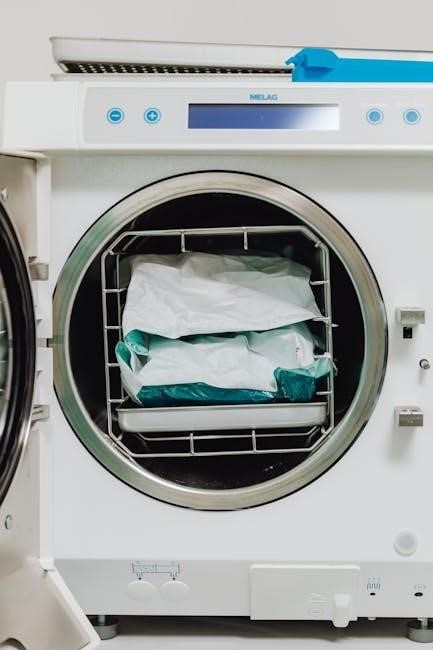
Proper loading is crucial for effective sterilization. Ensure all items are compatible with autoclave sterilization and free from debris. Pouches, instruments, and containers should be arranged to allow for free steam circulation – avoid overcrowding.
Place wrapped items on the chamber floor or on the provided racks, leaving space between each package and the chamber walls. Do not stack items directly on top of each other.
Liquids should be loaded in appropriate containers with vented caps to prevent pressure buildup. Always check that the door can close completely without obstruction. Improper loading can compromise the sterilization process and potentially damage the autoclave.
Cycle Selection (Specific Cycle Types)
The Midmark M11 offers various cycles tailored to different sterilization needs. Common cycles include unwrapped instrument sterilization, pouched instrument sterilization, and specific cycles for handpieces and other dental tools.
Cycle times and temperatures vary depending on the selected program. Refer to the cycle chart within this manual for detailed parameters of each cycle type.
Consider the type of load and manufacturer’s instructions when choosing a cycle. Selecting the appropriate cycle ensures effective sterilization while minimizing potential damage to instruments. Always verify the cycle selected before initiating the process.
Starting a Cycle
Before initiating a cycle, ensure the autoclave door is securely closed and locked. Verify the correct cycle has been selected on the display panel, and that the chamber is loaded appropriately, avoiding overcrowding.
Press the “Start” button to begin the sterilization process. The display will show cycle progress, including temperature, pressure, and remaining time.
Do not interrupt a cycle once it has started unless absolutely necessary. If interruption is unavoidable, follow the procedures outlined in the “Troubleshooting” section. Always allow the autoclave to complete the drying cycle before opening the door.
Monitoring Cycle Progress
Throughout each cycle, the Midmark M11’s display panel provides real-time information. Key indicators include current temperature, chamber pressure, and the estimated time remaining until cycle completion. Pay close attention to these parameters to ensure proper sterilization.
The display also indicates the current phase of the cycle – heating, sterilization, or drying. Any error messages will appear prominently on the screen, prompting immediate attention and troubleshooting.
Regularly observing the cycle progress allows for early detection of potential issues, ensuring a safe and effective sterilization process. Avoid opening the door during operation.
Understanding the Display Panel
The M11’s display features button functions, indicators, and error codes. It’s crucial to understand these elements for effective operation and troubleshooting procedures.
Button Functions and Indicators
The Midmark M11 autoclave display panel incorporates several buttons and indicators essential for operation. The ‘Power’ button initiates and terminates the unit’s operation. ‘Cycle Start’ begins the selected sterilization cycle, while ‘Door Open’ allows access to the chamber – though it may be restricted during a cycle. Indicators illuminate to signify various states, such as ‘Heating,’ ‘Sterilizing,’ and ‘Cycle Complete.’
The ‘Open the Door’ lamp illuminates when the door can be safely opened. Other indicators signal error conditions, prompting troubleshooting. Understanding these visual cues is paramount for safe and efficient autoclave use. The display also shows cycle progress and relevant parameters, providing real-time feedback to the operator. Refer to the error code section for detailed explanations of any displayed faults.
Error Codes and Troubleshooting
The Midmark M11 autoclave utilizes error codes to diagnose operational issues. These codes, displayed on the panel, pinpoint the source of the problem, guiding troubleshooting efforts. Common errors include issues with the heating element, door sensor malfunctions, or pressure irregularities. A “Heating Element” error suggests a potential failure requiring service. “Door Open” errors indicate a sensor problem preventing cycle start.
Consult the manual’s comprehensive error code list for specific solutions. Often, simple fixes like ensuring proper door closure or checking water levels resolve the issue. If an error persists, contacting Midmark support is recommended. Never attempt repairs without proper training. Ignoring error codes can lead to ineffective sterilization and potential safety hazards.
Display Messages Explained
The Midmark M11 autoclave’s display panel communicates crucial information throughout each cycle. Messages like “Heating,” “Sterilizing,” and “Drying” indicate the current phase of operation. “Cycle Complete” signals successful sterilization, while “Door Open” prompts user action. During startup, the display confirms system checks are passing.
Specific messages, such as “Low Water,” require immediate attention. The “M9D / M11D: Open the Door Lamp illuminates” message indicates a potential issue needing manual intervention. Understanding these messages is vital for safe and effective operation. Refer to the manual for a complete list and detailed explanations. Ignoring display prompts can compromise sterilization results and potentially damage the unit.

Maintenance and Cleaning
Regular cleaning—daily, weekly, and periodic—is essential for optimal performance and longevity of the Midmark M11 autoclave. Follow outlined procedures.
Daily Cleaning Procedures
To maintain optimal performance and hygiene, implement these daily cleaning steps. After each use, and at the end of the workday, thoroughly wipe down the autoclave’s exterior surfaces with a mild detergent and water solution. Pay close attention to the door gasket, ensuring it’s free from debris and properly sealed.
Inspect the chamber for any remaining instruments or residue; remove promptly. Clean the chamber interior with a damp cloth, avoiding abrasive cleaners. Regularly check and empty the condensate drain to prevent buildup. Finally, verify the proper functioning of the door lamp, as indicated in the manual, and address any issues immediately. Consistent daily cleaning contributes significantly to the autoclave’s lifespan and sterilization effectiveness.
Weekly Maintenance Tasks
Beyond daily cleaning, weekly maintenance ensures long-term reliability of your Midmark M11 autoclave. Each week, inspect the water reservoir and refill with distilled or deionized water, preventing scale buildup. Thoroughly clean the steam generator using a designated cleaning solution, following the manufacturer’s instructions.
Check the door gasket for wear and tear, replacing it if necessary to maintain a proper seal. Examine the drain line for obstructions and flush with water. Run a test cycle with a biological indicator to verify sterilization effectiveness. Document all maintenance activities in a logbook for tracking and compliance purposes. These proactive steps minimize downtime and uphold sterilization standards.
Periodic Preventative Maintenance
To guarantee optimal performance and longevity, the Midmark M11 requires periodic preventative maintenance, typically performed annually by a qualified technician. This includes a comprehensive inspection of all internal components, such as the heating element, sensors, and valves, ensuring they function correctly.
The technician will calibrate the temperature and pressure sensors for accurate sterilization. They will also inspect and test the safety features, like the door interlock and over-temperature protection. A thorough cleaning and disinfection of the entire system are crucial. Documenting these services is vital for maintaining warranty validity and demonstrating compliance with regulatory standards.

Troubleshooting Common Issues
This section details solutions for typical problems like door malfunctions, cycle failures, and steam leaks, ensuring quick resolution and minimal downtime.
Door Won’t Open
If the Midmark M11 autoclave door fails to open, first verify the cycle is completely finished and the pressure has fully vented. Attempting to force the door open prematurely is dangerous and can damage the unit.
Check the display panel for any error messages indicating a pressure issue or interlock malfunction. If a message appears, consult the ‘Error Codes and Troubleshooting’ section for specific guidance.
In some instances, the door may remain locked if a manual override is required. Refer to the service manual for instructions on safely releasing the door lock. Never attempt to bypass safety mechanisms. If the issue persists, contact Midmark support for assistance, providing the model number and any error codes displayed.
Cycle Fails to Start
If your Midmark M11 autoclave doesn’t initiate a cycle, begin by confirming adequate power supply and that the unit is properly switched on. Check the display panel for error messages; these provide crucial diagnostic information.
Ensure the door is securely closed and latched – the autoclave won’t start if the door isn’t fully sealed. Verify sufficient water levels in the reservoir, as low water can prevent cycle initiation. Also, confirm that the correct cycle type is selected for your intended load.
If problems continue, consult the error code section. Do not attempt to override safety features. Contact Midmark support, providing the model and error details.
Steam Leaks
Steam leaks from your Midmark M11 autoclave require immediate attention, as they pose a safety hazard and compromise sterilization effectiveness. First, carefully inspect the door gasket for damage or debris; a faulty gasket is a common cause.
Check all connections – water lines, drain lines, and the steam generator – for looseness or cracks. Tighten any loose fittings, but avoid over-tightening. Examine the chamber itself for any visible signs of corrosion or damage.
Do not operate the autoclave with persistent steam leaks. Discontinue use and contact a qualified Midmark service technician for repair. Ignoring leaks can lead to more significant problems and potential injury.
Technical Specifications
The Midmark M11 boasts specific dimensions, weight, electrical needs, and chamber volume crucial for proper installation and operational planning within facilities.
Dimensions and Weight
Understanding the physical characteristics of the Midmark M11 autoclave is essential for ensuring proper placement and accessibility within a healthcare setting. Precise dimensions are critical when integrating the unit into existing workspaces, guaranteeing sufficient clearance for operation, maintenance, and door swing.
While specific figures vary based on configuration, the M11 generally requires a dedicated footprint. Weight considerations are also paramount, particularly regarding floor load capacity and the need for appropriate support structures. Accurate weight data is vital for safe transportation and installation procedures.
Consult the detailed specifications sheet accompanying your specific M11 model for exact measurements and weight details. Proper planning based on these specifications prevents installation issues and ensures long-term operational efficiency.
Electrical Requirements
Proper electrical setup is paramount for the safe and effective operation of the Midmark M11 autoclave. Incorrect voltage or inadequate circuit capacity can lead to malfunction, damage, or even pose a safety hazard. The M11 typically requires a dedicated electrical circuit to prevent interference from other equipment.
Generally, the autoclave operates on a standard voltage, but specific amperage requirements vary depending on the model and optional features. Always verify the exact electrical specifications listed on the unit’s data plate and in the accompanying documentation.
Ensure the electrical outlet is properly grounded and meets all local electrical codes. A qualified electrician should perform the installation to guarantee compliance and safety.
Chamber Volume
Understanding the chamber volume of the Midmark M11 autoclave is crucial for efficient and effective sterilization. The chamber’s capacity dictates the quantity and size of instruments that can be processed in a single cycle, impacting workflow and turnaround times.
The M11 autoclave is available in various chamber sizes to accommodate different practice needs. Common chamber volumes range from approximately 17 liters to 24 liters, though specific dimensions may vary based on the model configuration.
Proper loading practices are essential to ensure steam penetration and complete sterilization of all instruments. Overloading the chamber can compromise sterilization effectiveness, while underloading may be inefficient. Refer to the loading guidelines within this manual for optimal chamber utilization.

Service and Support
Midmark provides comprehensive support, including contact information, service manual access, and parts ordering details, ensuring continued M11 autoclave performance.
Contacting Midmark Support
For immediate assistance with your Midmark M11 Autoclave, reaching out to their dedicated support team is crucial. Midmark offers multiple avenues for support, ensuring prompt resolution of any issues you may encounter. You can connect with them through their official website, which features a comprehensive support section with FAQs, troubleshooting guides, and downloadable resources.
Alternatively, you can directly contact Midmark’s customer service via phone during their business hours. Their knowledgeable representatives are equipped to address technical questions, provide guidance on operation, and assist with service requests. Furthermore, Midmark often provides access to online chat support for quick and convenient assistance. Be prepared to have your autoclave’s model number and serial number readily available when contacting support to expedite the process.
Service Manual Availability
Access to the Midmark M11 Autoclave service manual is typically restricted to authorized service technicians due to the complex nature of the repairs and safety considerations involved. However, Midmark does offer service manuals to qualified organizations that demonstrate a legitimate need for detailed repair information.
To inquire about obtaining a service manual, you must contact Midmark Support directly and provide proof of your credentials as a certified biomedical equipment technician or a representative of an authorized service facility. The manual contains in-depth schematics, diagnostic procedures, and component-level repair instructions. Unauthorized attempts to repair the autoclave without proper training and documentation can void the warranty and potentially create hazardous conditions.
Parts Ordering Information
Genuine Midmark replacement parts are crucial for maintaining the performance and safety of your M11 Autoclave. To order parts, contact Midmark directly through their official website or by calling their customer support line. You will need the autoclave’s serial number and the specific part number you require.
Midmark’s online parts catalog provides detailed diagrams and part numbers for easy identification. Alternatively, authorized Midmark distributors can also assist with parts ordering. Always use genuine Midmark parts to ensure compatibility and avoid potential issues caused by aftermarket components. Using non-approved parts may void your warranty and compromise the autoclave’s sterilization effectiveness.